AstoundDrive vs Google Takeout
Need to download Google Drive folders? See why AstoundDrive is the faster, more secure alternative to Google Takeout.
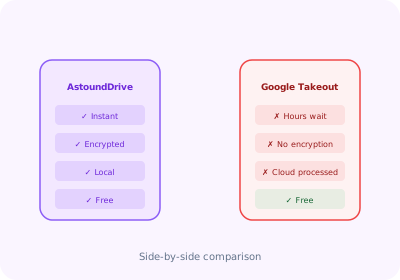
| Feature | AstoundDrive | Google Takeout |
|---|---|---|
| Download specific folders | Yes | Yes |
| Instant download (no waiting) | Yes | No |
| AES-256 encryption | Yes | No |
| Password-protected ZIP | Yes | No |
| SHA-256 file checksums | Yes | No |
| Google Workspace file export | Auto | Manual |
| Works from Google Drive UI | Yes | No |
| 100% local processing | Yes | No |
| Download progress tracking | Yes | No |
| Price | Free | Free |
Key Differences Explained
Speed: Instant vs Hours of Waiting
Google Takeout requires you to select data, wait for Google to prepare the archive (which can take hours or even days), then download via an email link. AstoundDrive downloads folders directly from your browser — no waiting, no email links, no intermediate servers.
Security: AES-256 Encryption Built In
Google Takeout creates unencrypted ZIP/TGZ files. Anyone who gains access to the archive can read all your files. AstoundDrive encrypts every ZIP with AES-256 before saving — your password never leaves your device.
Convenience: Works Inside Google Drive
AstoundDrive integrates directly into the Google Drive interface. Right-click a folder, click "Download ZIP," set a password, and you're done. Google Takeout requires navigating to a separate website and configuring export settings.
Skip the Wait — Download Google Drive Folders Instantly
Free Chrome extension with AES-256 encryption. No waiting, no email links.
Install AstoundDrive — Free